Turn an order into a bill
Make the bill when the guests finish, then take their payment.
Who can do this: Owner, Manager and Cashier
For restaurantsWhen the guests finish eating, turn their order into a bill. Orio360 adds the GST and saves the payment in one go.
Bill the order
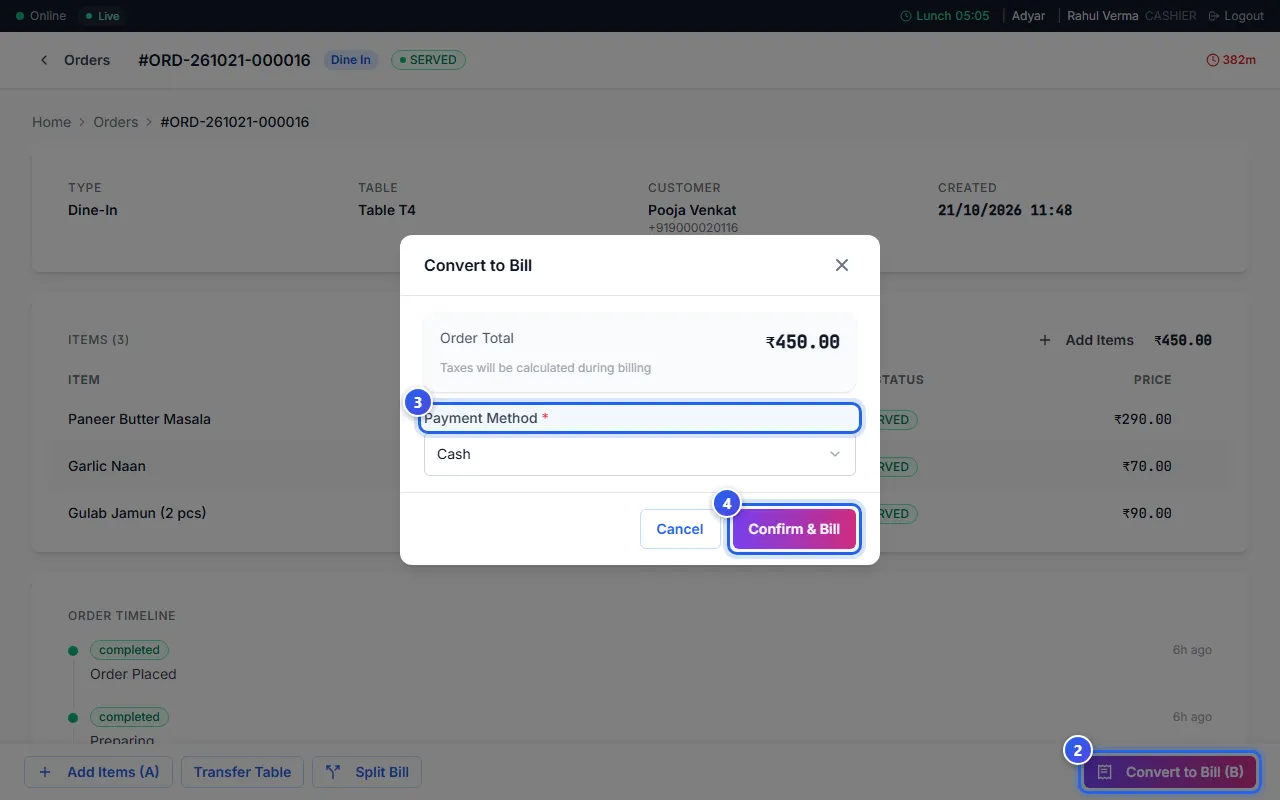
- Open the order. It must say READY or SERVED at the top.
- Press Convert to Bill (B) at the bottom right. You can also press the B key.
- Choose how the guest pays in Payment Method, like Cash, UPI or Card.
- Press Confirm & Bill.
The message Order converted to bill successfully. shows. Then the till opens your list of bills.
What changes after the bill
- The order now says BILLED. You cannot add dishes to it.
- A dine-in table turns to Cleaning on the Floor Plan. When it is clean, press the table and then Mark as Available.
- The Order Total in the box does not have tax in it. The bill adds the tax.
Start from the table
On the Floor Plan, press the busy table. Then press Close Bill. The same box opens, so you go straight to step 3.
Related help
Use the table screen
See which tables are free or busy, and move or join tables.
For restaurants
Send an order to the kitchen
Add dishes to an order and send a KOT so the kitchen starts cooking.
For restaurants
Find and print a past bill
Look up an old bill at the till and print it again.
Take a payment
Finish a bill and take cash, UPI, card or a split payment.
Still need help?