The till says it is offline
Learn what offline means and how to keep billing until the internet comes back.
Who can do this: Owner, Manager and Cashier
When the till cannot reach Orio360, it is offline. Do not worry. You can keep making bills. The till keeps them and sends them to Orio360 when the internet is back.
See why the till is offline
- Look at the dark bar at the top of the screen. It says Offline in red.
- Read the orange bar under it. It tells you why.
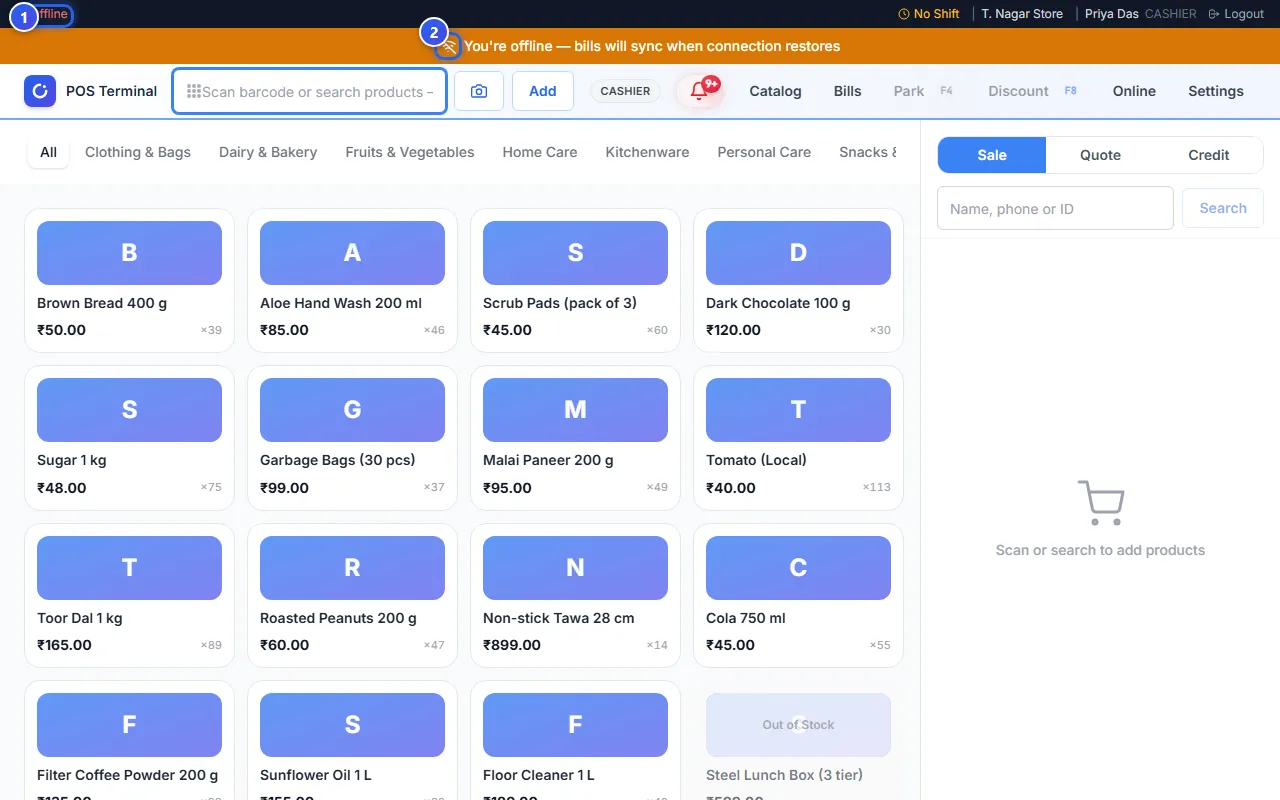
The orange bar shows one of two messages:
- You're offline — bills will sync when connection restores. This till has no internet.
- Server unreachable — bills will be saved locally. This till has internet, but it cannot reach Orio360.
A small box on the orange bar, like 3 pending, shows how many bills wait to be sent.
Bring the internet back
- Keep billing. Press Pay and take the payment, the same as always.
- Check the cable or the Wi-Fi of this till.
- Open another website on this till. If it does not open, the internet is down.
- Turn your internet router off and on again.
- Wait. The till checks again by itself.
When Orio360 answers, the orange bar turns blue. It says Syncing 3 pending transactions... while the till sends your bills. Then the bar goes away, and the dark bar says Online.
Do other websites open, but the bar still says Server unreachable? Then wait a few minutes. If it lasts a long time, contact us.
While you are offline
- For UPI or card, check that the money came in before you finish the bill.
- Some pages need the internet, like Bills and Catalog. See Keep billing when the internet stops.
- After a long time offline, you may need to sign in again. See It says your session ended.
Related help
Keep billing when the internet stops
Make bills with no internet, and Orio360 sends them when the internet comes back.
Some bills have not synced
Find the bills that did not reach Orio360 and send them again.
It says your session ended
Learn why Orio360 signs you out after 30 minutes and how to sign in again.
Still need help?