See who changed what
See a list of who added, changed or deleted things, and when.
Who can do this: Owner and Manager
The audit log lists each change that people make in Orio360. It shows who made the change, what it was, and when. Nobody can change or delete this list.
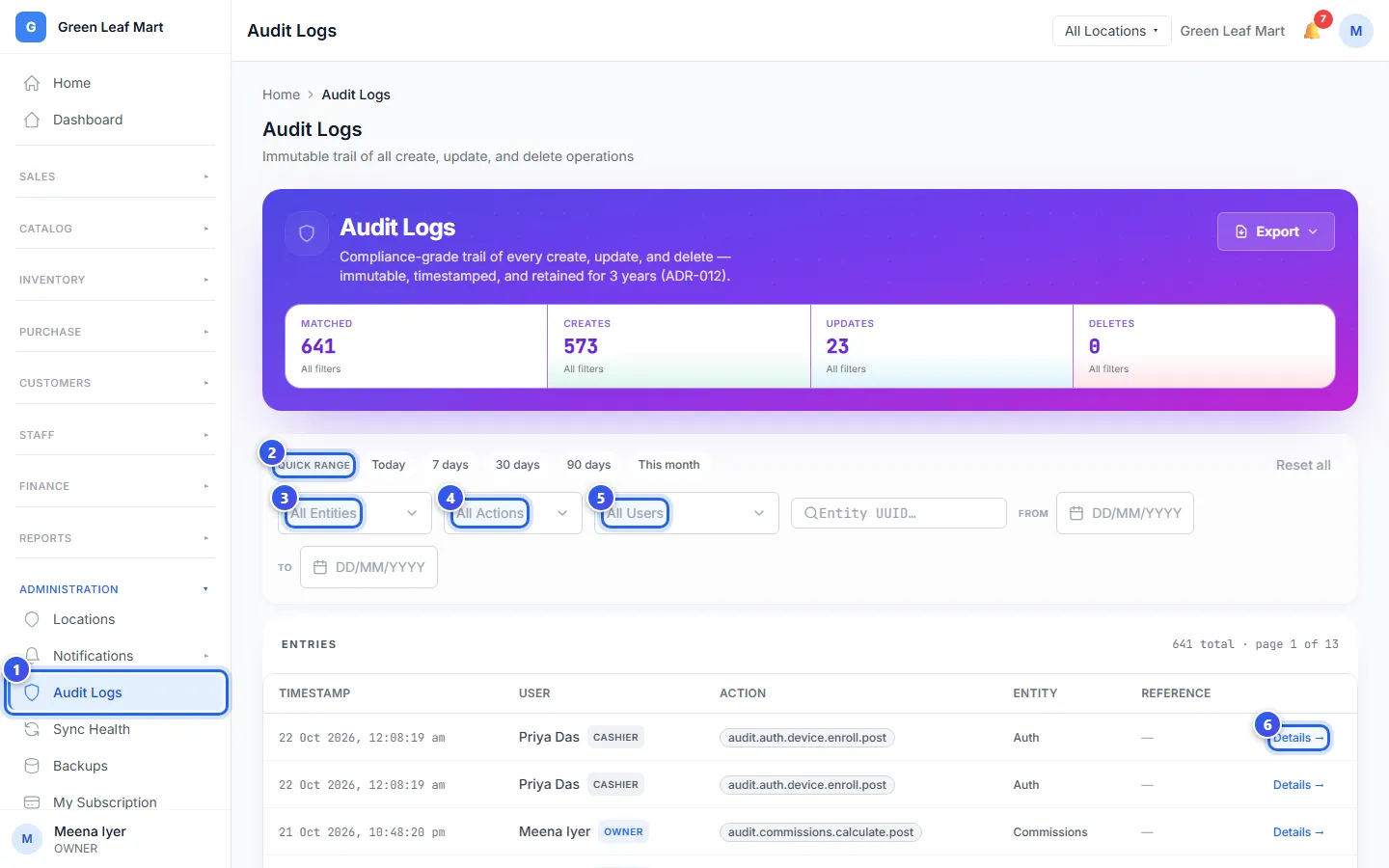
- In the Administration group, press Audit Logs.
- Under Quick range, press a time, like Today or 7 days.
- To see one kind of record, like a bill, choose it in All Entities.
- To see only new, changed or deleted records, choose it in All Actions.
- To see the changes of one person, choose them in All Users.
- Press Details → on a row to see that change.
The Audit Entry panel opens on the right. Under Before → After, it shows the record before and after the change. Passwords and codes are always hidden.
The boxes at the top count the changes in your list: Creates, Updates and Deletes. To start again, press Reset all.
To keep a copy of the list, press Export.
Related help
Change a staff member's details
Change a staff member's role or locations, or stop them from signing in.
Make staff use 2-step sign-in
Ask your staff to type a second code from their phone when they sign in.
Find any bill in the admin app
Search the bills from every till and open the details of one bill.
Still need help?