Set how much you can make for a festival
Set how many orders you can take and watch for alerts when you get close.
Who can do this: Owner
For restaurantsThis is not in every plan. See Pricing.
Your kitchen can make only so much for a festival. Set the most orders you can take. When the bookings reach that number, Orio360 takes no more bookings for the festival. Only an Owner can change the number. A Manager can see the page.
Set the number
- In the menu, open Restaurant, then Bookings and Orders. Press Capacity.
- Choose the festival in the box at the top.
- Type the most orders you can take in Max / Day.
- Press Save Settings.
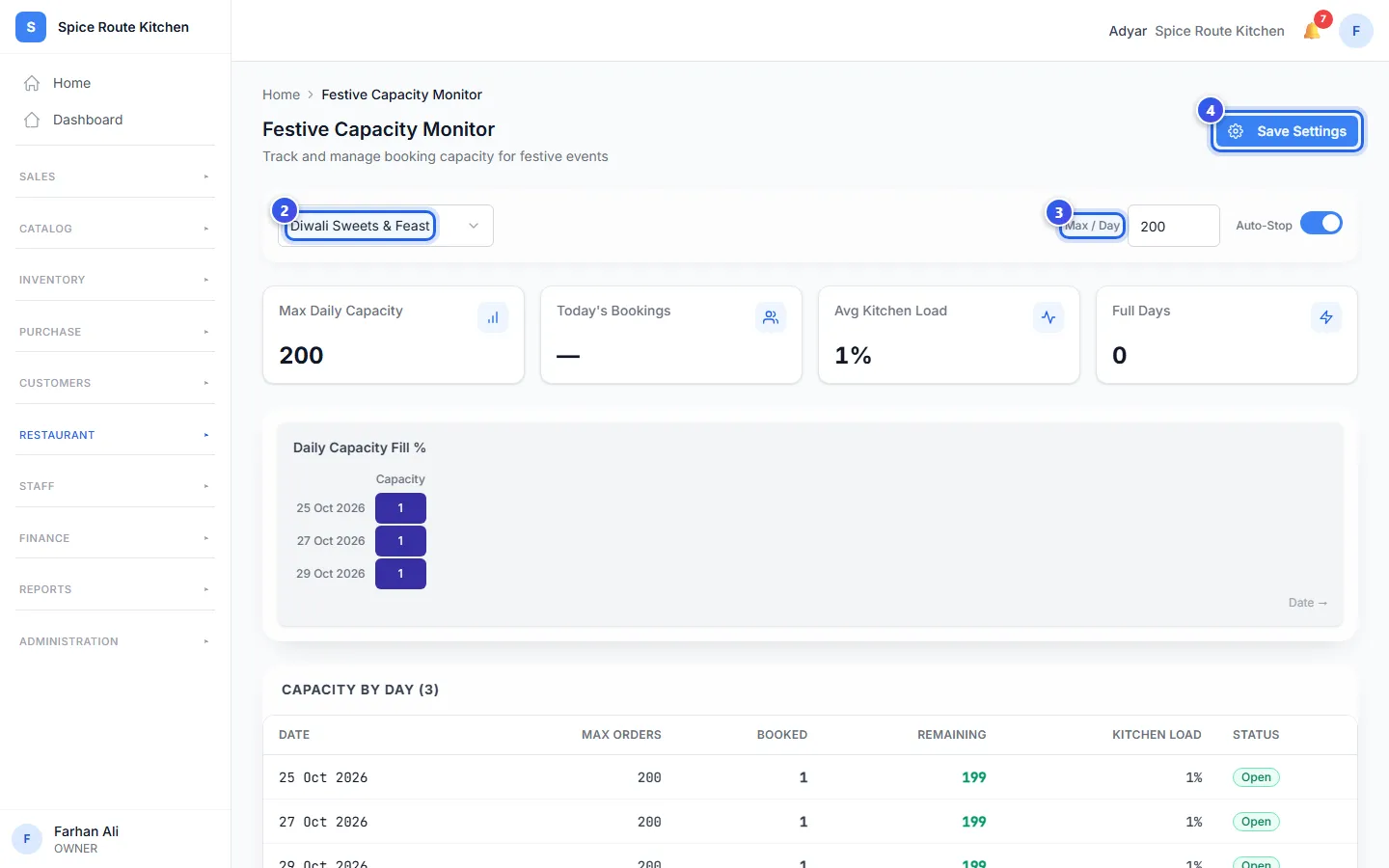
The message Capacity settings saved shows. This is the same number as Max Total Orders on the festival. So when you change one, the other changes too.
Read the table
Capacity by Day has a row for each day that guests want their orders.
- Booked is how many orders are for that day.
- Remaining is how many more you can take.
- Status is Open, Filling or Full. Filling means 80% or more is booked.
A yellow note at the top lists the days that are 80%+ booked.
Watch the alerts
Go to Bookings and Orders, then Alerts. Orio360 checks your festivals each time you open this page. It adds an alert when:
- a festival starts in 25 to 35 days (Preparation),
- a festival starts in 10 to 20 days (Stock),
- the last day to book is 3 days away or less (Booking),
- 80% or more of the festival is booked (Capacity),
- a festival starts within 7 days (Reminders).
Each tab at the top shows one kind of alert. Press Dismiss when you have dealt with an alert. A Manager can read and dismiss alerts too.
Related help
Plan a festival or event
Set up a festival with its dates and a special menu.
For restaurantsOn some plans
Plan what to cook
See which ingredients your festival orders need, and which ones you must buy.
For restaurantsOn some plans
Manage festival bookings
See all festival bookings in a list or a calendar and take deposits.
For restaurantsOn some plans
Still need help?