What guests see when they book online
See the page guests use to book a festival order from a link.
Who can do this: Owner and Manager
For restaurantsThis is not in every plan. See Pricing.
A booking link lets guests book a festival order from their own phone. Each link belongs to one festival and one location. Guests do not sign in.
What a guest does first
- The guest opens your booking link, or scans its QR code.
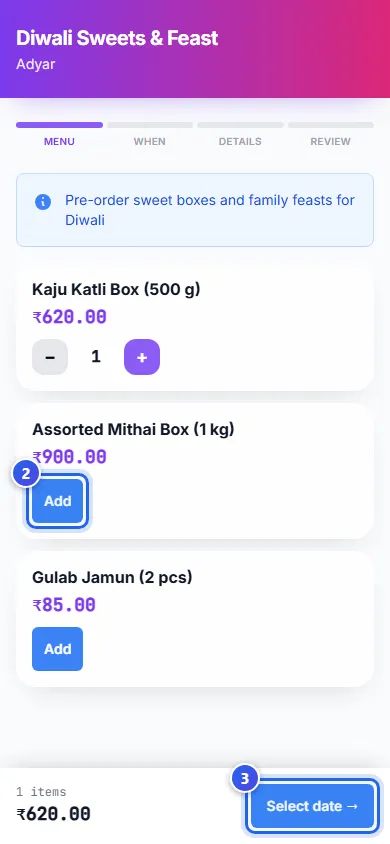
- They press Add next to each item they want. Then + and − change how many.
- They press Select date → in the bar at the bottom. The bar shows the items and the total.
What is on the page
- The festival name and your location are at the top.
- A short note about the festival shows under the bar of steps.
- Each item shows its name and its price.
- The bar of steps shows the 4 parts of a booking: Menu, When, Details and Review.
When a link does not work
The page tells the guest what went wrong:
- This booking link has expired means the link is too old.
- This booking link is no longer active means someone turned the link off.
- Bookings have closed means the festival does not take new orders now.
In each case, the guest needs a new link from you.
Get a booking link
No button in the apps makes a booking link. To get one for your festival, please contact us.
Related help
See festival orders at the till
Check the festival orders guests booked, with their delivery dates and status.
For restaurantsOn some plans
What guests see on your menu page
See the menu page that opens when a guest scans your QR code.
For restaurants
Share your menu with a QR code
Make a QR code that guests scan to see your menu on their phone.
For restaurants
Still need help?