See festival orders at the till
Check the festival orders guests booked, with their delivery dates and status.
Who can do this: Owner and Manager
For restaurantsThis is not in every plan. See Pricing.
Before a big festival, guests book sweets and meals days ahead. Each one is a festival order. The Festive Orders page at the till lists them, so you know what to make and when.
Check the festival orders
- Open the Festive Orders page at the till. See the tip below for how.
- Choose a status in All Statuses, like Confirmed, to see only those orders.
- Look at Delivery to see the day and time each guest wants the order.
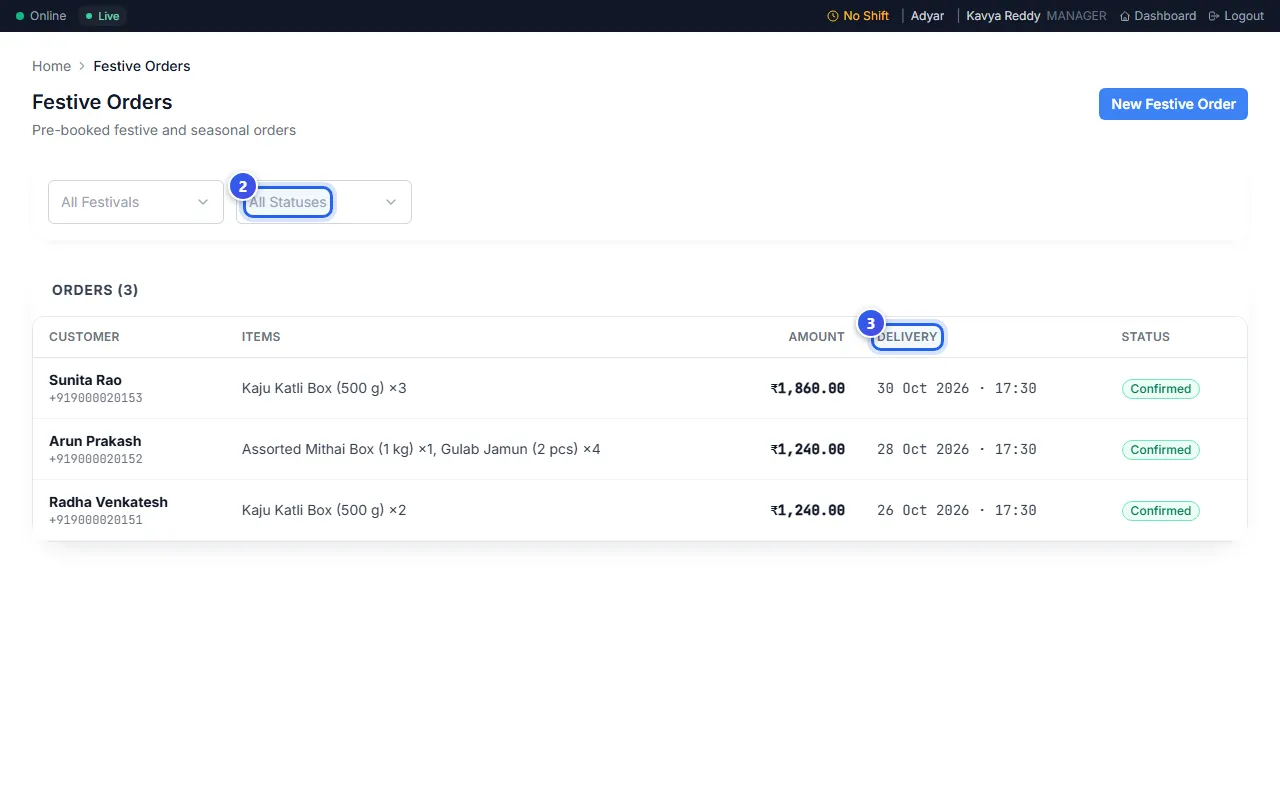
Each row shows the guest under Customer, with their phone number. Items lists what they ordered, and Amount is the price of the whole order.
What each status means
- Booked: the guest has booked the order.
- Confirmed: the order is set and will go ahead.
- In Production: the kitchen is making it.
- Ready: the order is ready for the guest.
- Delivered: the guest has the order.
- Cancelled: the order will not go ahead.
This page only shows orders. The New Festive Order button does not add an order here. Guests book from your booking link instead.
Related help
What guests see when they book online
See the page guests use to book a festival order from a link.
For restaurantsOn some plans
See all open orders
Check every order that is cooking, ready or waiting for its bill.
For restaurants
Learn who can do what
See what an Owner, a Manager and a Cashier can each do in Orio360.
Still need help?