What guests see on your menu page
See the menu page that opens when a guest scans your QR code.
Who can do this: Owner and Manager
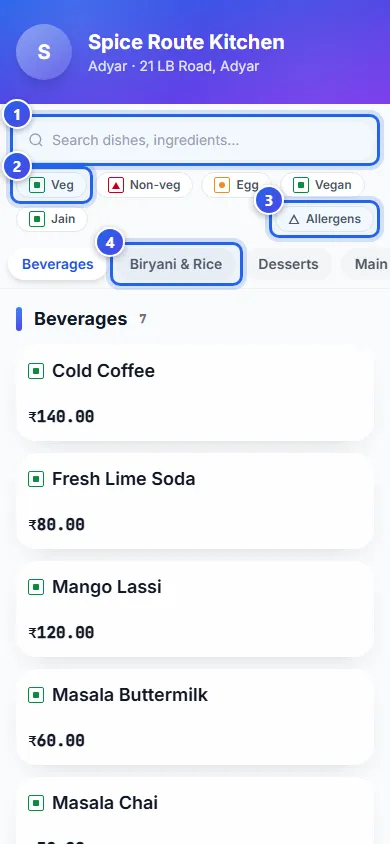
For restaurantsWhen a guest scans your menu QR code, this page opens on their phone. It shows your restaurant name, the location and every dish with its price. Guests do not sign in.
What a guest can do
- Type a dish or an ingredient in the search box at the top.
- Press Veg, Non-veg, Egg, Vegan or Jain to see only those dishes.
- Press Allergens, then press a word like milk. Dishes with it go away.
- Press a category, like Desserts, to jump to it.
What each dish shows
- A green square means veg. A red triangle means non-veg. An orange dot means it has egg.
- Up to 3 red chillies show how spicy the dish is.
- A Bestseller label marks a dish that sells a lot.
- A dish you cannot order now says Currently unavailable in red.
At the bottom, About these icons tells guests what each mark means. It also asks guests with an allergy to check with your staff.
Good to know
- Guests look at the menu here. They order from your staff, as usual.
- The page shows the menu of the location that the QR code belongs to.
- If you have a lunch menu and a dinner menu, the page shows the one for this time of day.
Related help
Still need help?