Look up a recipe at the till
Find a dish's recipe at the till and see what it costs to make.
Who can do this: Owner and Manager
For restaurantsA recipe lists what goes into one dish. When you sell the dish, Orio360 takes each ingredient out of your stock. The Recipes page at the till shows what each dish costs you to make.
Find a recipe
- Open the Recipes page at the till. See the tip below for how.
- Type the name of the dish in the search box, like paneer.
- Find the dish in the list.
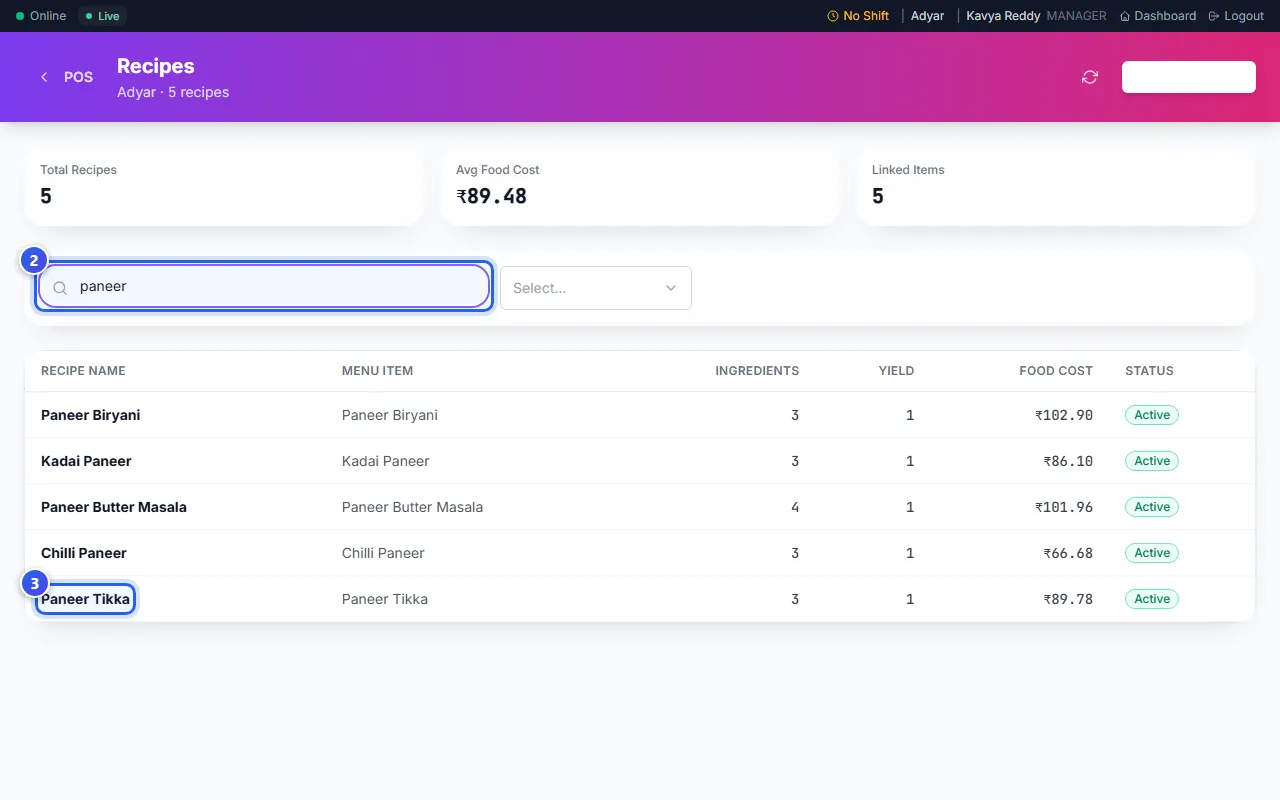
What each column shows
- Recipe Name is the name of the recipe.
- Menu Item is the dish on your menu that uses it.
- Ingredients is how many things go into the dish.
- Yield is how many plates one recipe makes.
- Food Cost is what the ingredients cost you.
- Status shows Active when the recipe is in use.
The cards at the top show how many recipes you have. Avg Food Cost is the cost of an average dish. Linked Items counts the recipes that belong to a dish on your menu.
Change a recipe
A Manager or an Owner sets up recipes in the admin app. Go to Restaurant, then Recipes. There you can see each ingredient and how much of it goes in.
Related help
Still need help?