Find your way in the POS app
Learn the buttons at the top of the billing screen at the till.
Who can do this: Owner, Manager and Cashier
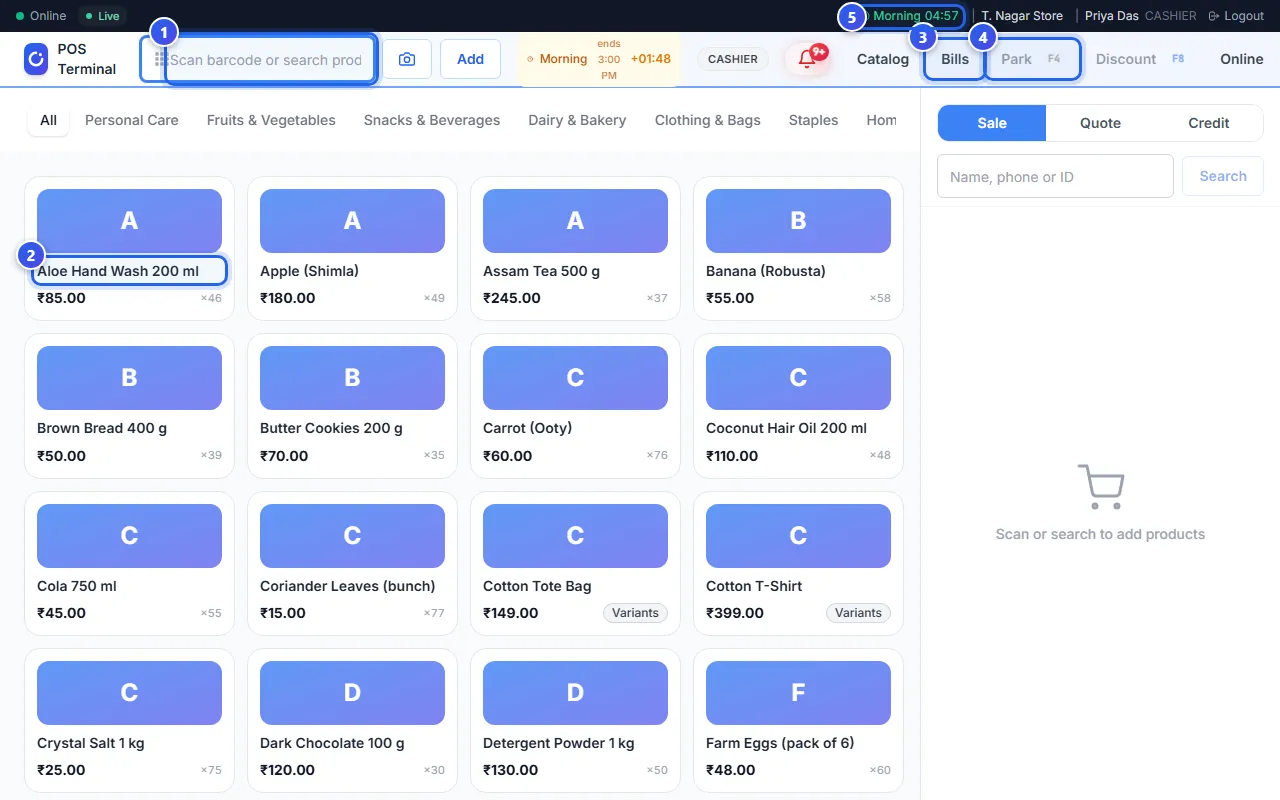
The POS app opens on the billing screen. Your products are in the middle, and the bill is on the right. The 2 bars at the top hold the buttons you need most.
Use the billing screen
- Scan a barcode, or type a product name in the search box.
- Press a product to put it on the bill.
- Press Bills to see the bills you made before.
- Press Park to keep this bill for later and serve the next customer.
- Press your shift in the dark bar at the very top to close your shift.
The top bar
- Catalog opens your full list of products.
- Park and Discount work on the bill you are making. They only work when the bill has items.
- Online shows the orders from your online store.
- Settings sets up this till, like its printer.
- A Manager and an Owner also see Quick-Add, Transfers and Void.
- In a restaurant, Tables shows all your tables.
The dark bar at the very top
Related help
Still need help?