Reward customers with points
Choose how many points customers earn on a bill and what each point is worth.
Who can do this: Owner
This is not in every plan. See Pricing.
Give customers loyalty points when they buy. They can use the points to pay next time. You choose how fast they earn points and what a point is worth.
Set up your points
- Go to Loyalty.
- Press Configure Program.
- Turn on Enable loyalty program.
- In Points per ₹1, type the points for each rupee. For 1 point on every ₹100, type 0.01.
- In Min Redemption (points), type the fewest points a customer needs before they can use them.
- In Redemption Value (₹ / point), type what 1 point is worth.
- In Point Expiry (months), type how long points last. Type 0 if they never end.
- Press Save Configuration.
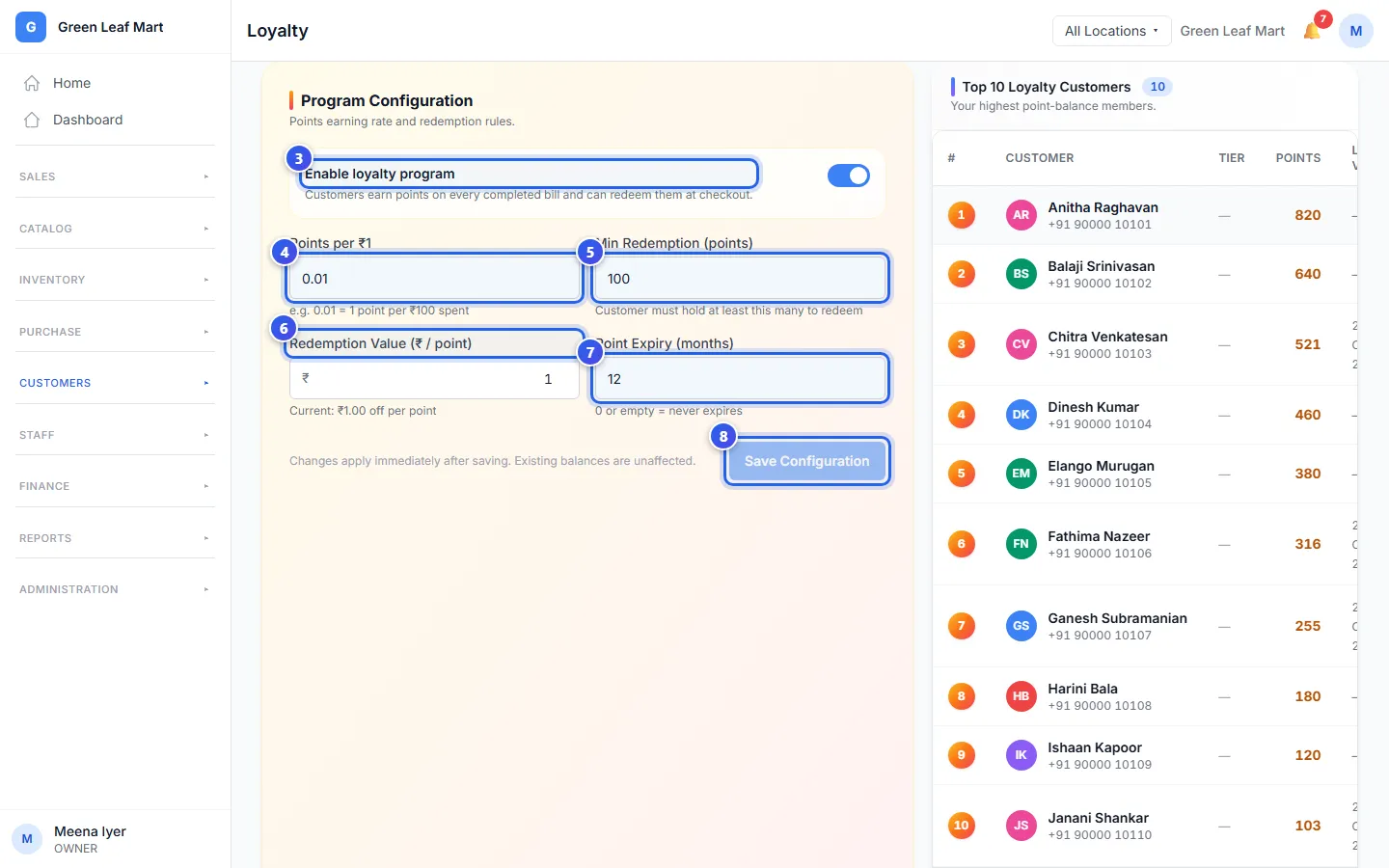
The new rules work from the next bill. Points that customers already have stay the same.
An example
Say you type 0.01 points per ₹1, and each point is worth ₹1. A customer pays a ₹2,500 bill, so they earn 25 points. Later, 25 points take ₹25 off a bill.
- Orio360 rounds down. A ₹250 bill earns 2 points, not 2.5.
- Only a bill with a customer on it earns points.
- A bill paid with points earns no new points.
See who has points
The Loyalty page also shows your Top 10 Loyalty Customers. Look under Recent Loyalty Activity to see who earned or used points, and on which bill.
Change a customer's points by hand
Open the customer's profile and press Adjust Points. Choose Credit (add) or Debit (deduct). Type the Points and a Reason of at least 10 letters. Then press Confirm Points Adjustment. Only the Owner can do this.
Related help
Use points or a voucher on a bill
Let a customer pay with loyalty points, or take money off with a voucher code.
On some plans
Find a customer and see their history
Look up a customer, then see their bills, points, store credit and membership.
Sell a membership plan
Make a paid membership plan that takes money off every bill, and add customers to it.
On some plans
Still need help?