Change a purchase order
Change the items or amounts on a purchase order after you send it.
Who can do this: Owner and Manager
This is not in every plan. See Pricing.
Plans change. The supplier may have less stock, or a new price. You can change a purchase order after it is approved. Orio360 keeps a record of each change. An Owner or a Manager can do this.
Change a draft
Is the order still a Draft? Then an Owner can press Edit PO and change anything. Do this when a line says Cost to be confirmed. Approve stays off until every line has a cost.
- Open the draft from the Purchase PO list.
- Press Edit PO.
- Press Next. Type the Unit Cost of each line.
- Press Next, and check the order.
- Press Create Purchase Order. This saves your changes on the same order.
- Press Approve. In the box, press Approve again.
On a draft you can also change the Currency and its exchange rate. A new currency clears the costs you typed, so type them again.
Amend an approved order
- Open the order from the Purchase PO list.
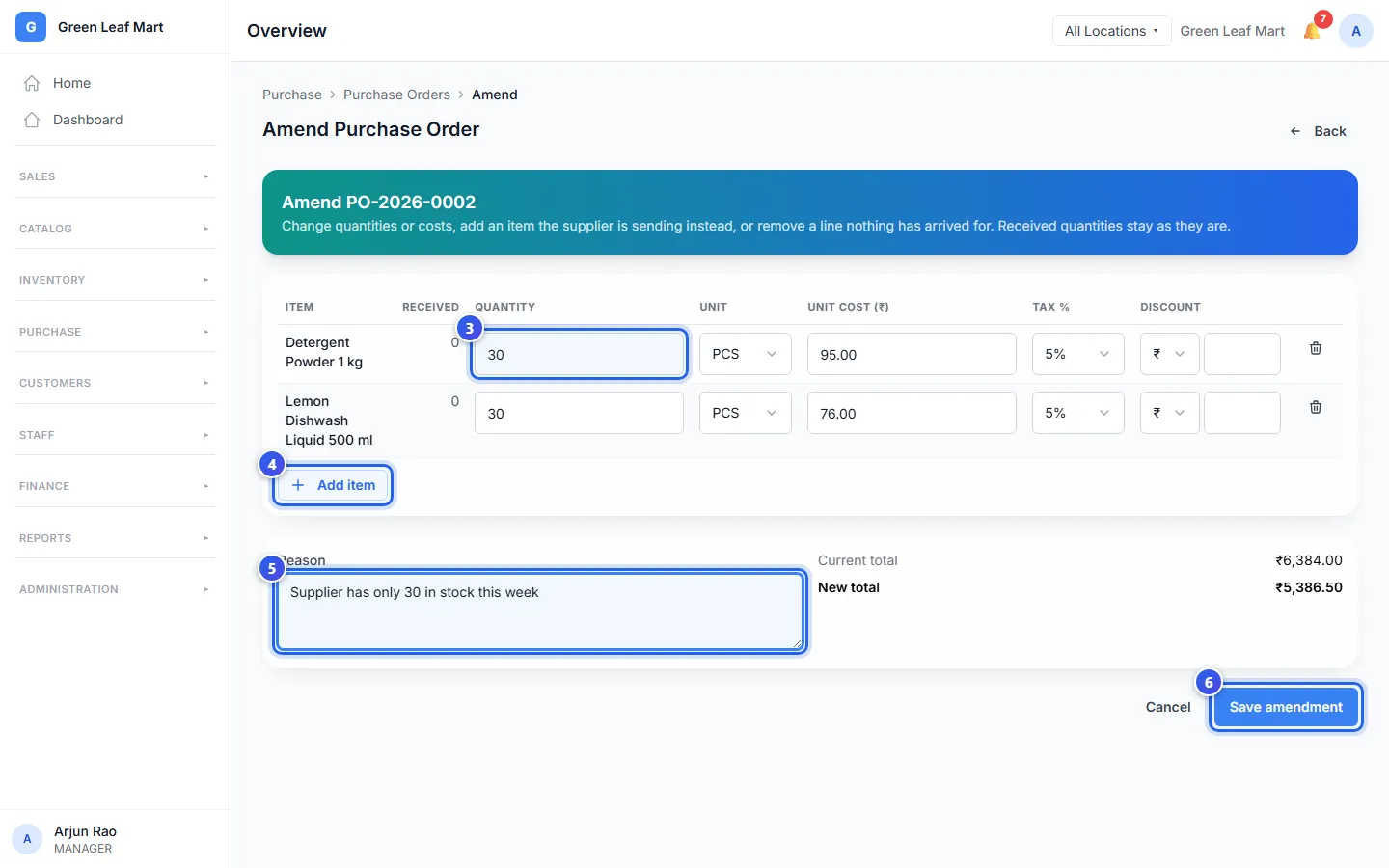
- Press Amend PO.
- Change the Quantity or the Unit cost (₹) of a line.
- To add a product, press Add item. Then choose the product.
- Type why you made the change in Reason.
- Press Save amendment.
The order shows the new lines and the new total. Each change shows under Revisions on the order. The currency of an approved order stays the same.
To take off a line, press the bin next to it. You can do this only when none of that item has come yet. Amounts you already received stay as they are.
When the total goes up
A Manager may make the total bigger. Then the button says Send for approval. The order stays as it was until an Owner says yes. The Owner opens the order, reads the change, and presses Approve or Reject.
When the rest will not come
Some goods came, but the supplier cannot send the rest. Open the order and press Close remaining. Type the Reason, and press Close remaining in the box. Orio360 stops waiting for those items. What came stays in your stock.
Related help
Still need help?