Open your shift
Count the cash in the drawer and open your shift before you make bills.
Who can do this: Owner, Manager and Cashier
Open your shift when you start work at the till. Then Orio360 knows who made each bill. It also knows how much cash was in the drawer at the start.
You can put items on a bill without a shift. But you need an open shift to take a payment.
Start your shift
- Sign in to the POS app.
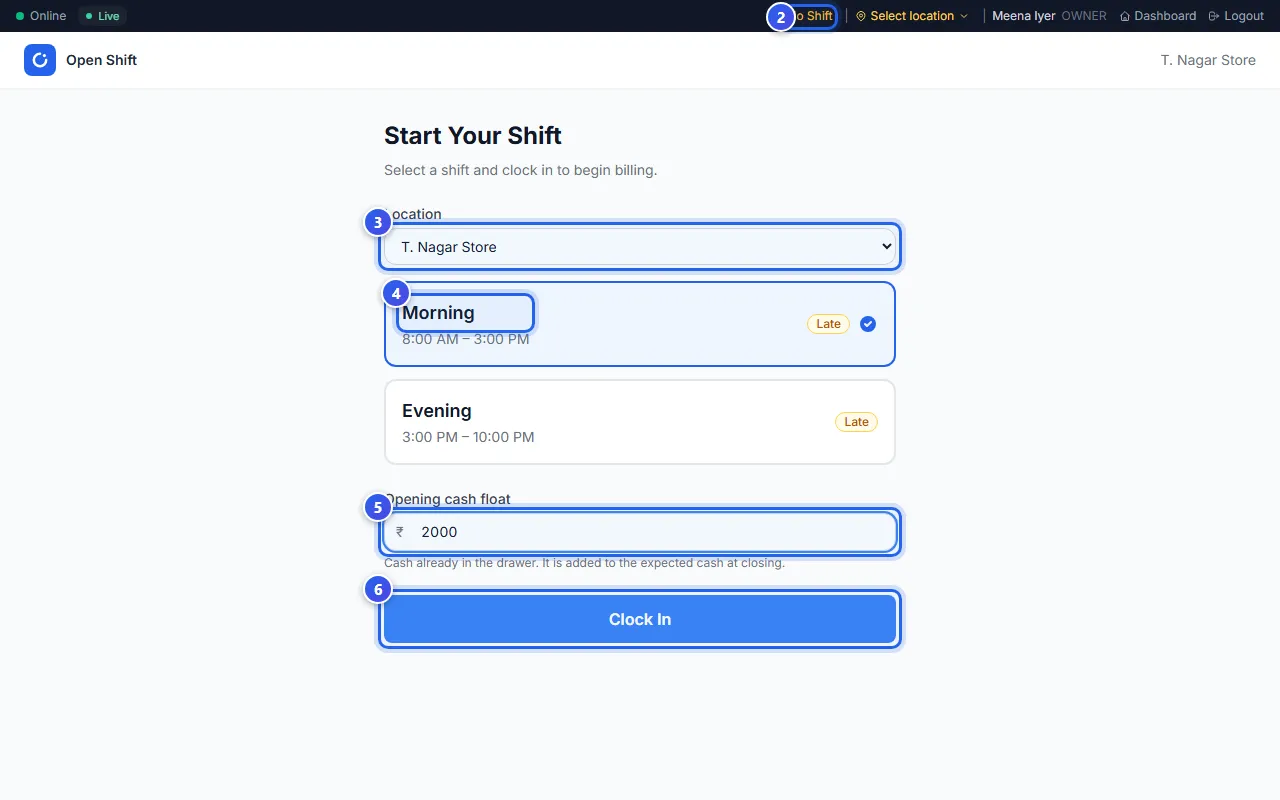
- Press No Shift in the dark bar at the top. The Open Shift page opens.
- Check the Location. You see this box only if you work in more than one location.
- Choose your shift, like Morning.
- Count the cash in the drawer. Type the amount in Opening cash float.
- Press Clock In.
The billing screen opens. Your shift name now shows in the dark bar, with the time since you started.
What the shift cards say
- On Time means you are starting at the right time.
- Upcoming means the shift has not started yet.
- Late means you are more than 15 minutes after the start time.
The cash you type at the start counts at the end of the day. When you close your shift, Orio360 adds it to the cash it expects in the drawer.
Related help
Still need help?