Cancel a bill before payment
Clear a bill the customer does not want, before anyone pays.
Who can do this: Owner and Manager
Sometimes a customer changes their mind before they pay. Then you void the bill. To void means to cancel. All the items come off the bill, and you start again.
Only a Manager or an Owner can void a bill on the billing screen. A Cashier does not see the Void button.
Void the bill
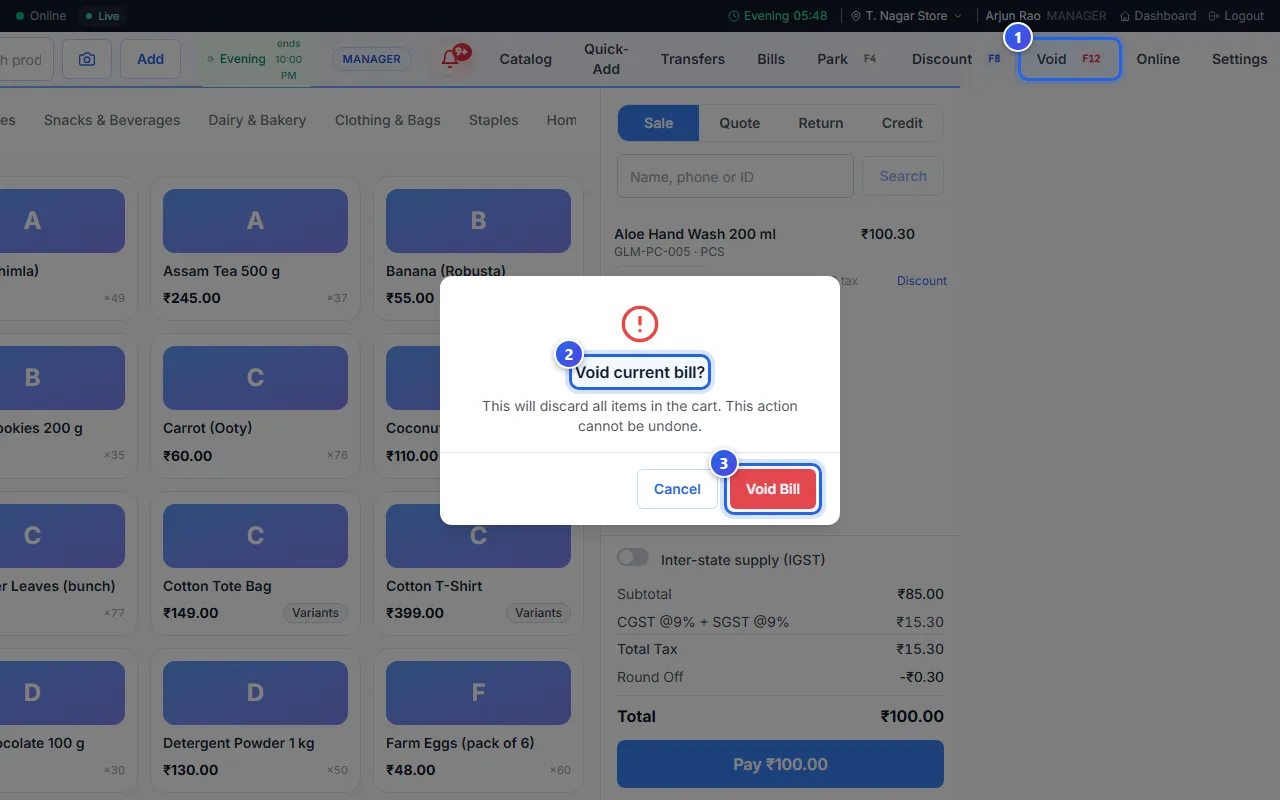
- Press Void at the top of the screen. You can also press the F12 key.
- Read the message Void current bill? It warns that you cannot undo this.
- Press Void Bill.
The bill is empty, and the message Bill voided. shows. Serve the next customer.
Press Cancel in the message if you want to keep the bill.
If you are a Cashier
- To take off one item, point at it on the bill. Press the small cross next to its price.
- To clear the whole bill, ask a Manager to void it.
- Is the customer coming back? Park the bill instead. See Park a bill and finish it later.
After the customer pays
You cannot void a paid bill. Take the items back with a return instead. See Take back items from a customer.
Related help
Still need help?